
Core concepts
How workspaces, collections, entries, schemas, versions, and channels work together.
This page explains the main parts of Andesine and how they relate.
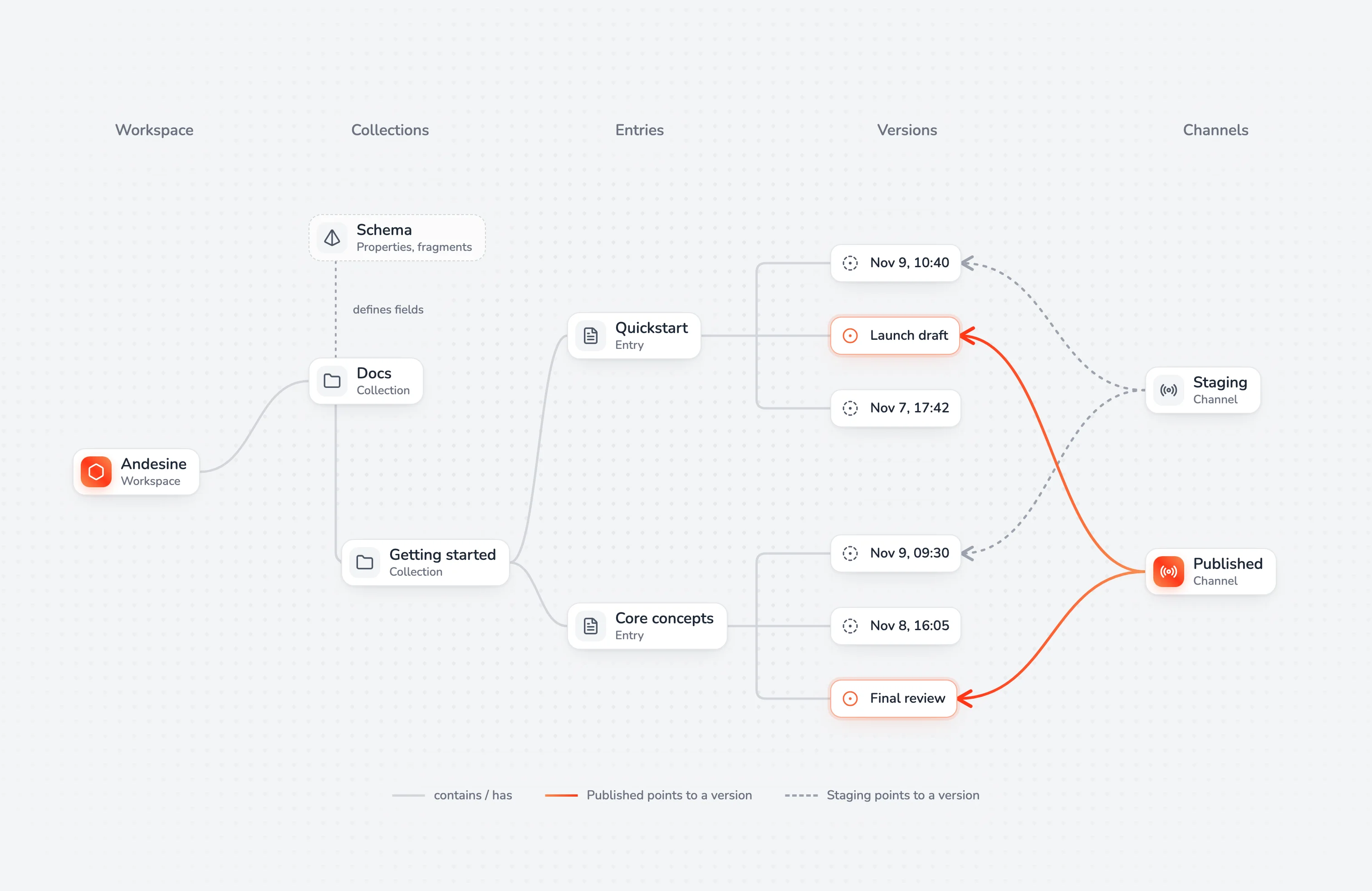
Workspaces
A workspace holds your content, your team, and your settings. Each workspace has its own members, roles, API keys, extensions, and plan. You can be a member of many workspaces and switch between them in the profile menu.
Collections
Collections organize content in a tree, like folders. A collection can hold entries and other collections, to any depth. Some settings apply to a whole collection and everything in it:
Schema: the fields that its entries have.
Publishing: whether its entries can be published.
Access: a restricted collection is visible only to the members and groups that you add.
Entries
An entry is one document: a guide, an article, a page of documentation, or a record. It has a name, which is also its title, and rich content. In a collection with a schema, the content is inside the schema's fields.
Each collection and entry has an ID, such as coll_5lYvYOrQq6tCJ6ZeMSExV1 or ent_4rlbOHHvI4DtjKq1cbUi0T, and a path made from the names, such as /Docs/Getting started/Quickstart. IDs never change. Paths change when you rename or move content. Use Copy ID in the menu of a collection or entry to get its ID.
Schemas
A schema gives the entries of a collection the same structure. It has two kinds of fields:
Properties hold one value: text, a number, a checkbox, a date, a URL, or one or more options.
Fragments are named areas of rich content, such as
SummaryandContent. A fragment can allow only some blocks.
Collections inside a collection inherit its schema and can add fields. See Schemas.
Versions
Andesine saves versions of each entry while you edit. You can also save a named version at any time. Compare any version with the current content, and revert to it if necessary. See Versions.
Channels and publishing
The current version of an entry is what editors see. A channel is what readers see. Publishing assigns a version of an entry to a channel. Each workspace has the Published channel, and you can add more, for example Staging.
The API with a publishable key, hosted sites, and GitHub Sync read from a channel. So you can keep editing without changing what readers see, and publish when the content is ready. See Publishing and channels.
Members, roles, and access
Members join a workspace by invitation. Each member has a role, such as Admin, Developer, Editor, or Viewer, which sets what they can do. Roles can also be given per restricted collection, to members or to groups. See Roles and permissions.
Keys and connected apps
Secret keys give your servers and scripts access to the API, with the permissions that you choose.
Publishable keys give websites read access to published content only.
Connected apps, such as AI apps through MCP, act for you with your permissions in one workspace.
See API overview and Connect an AI app.
Extensions
Extensions add features to a workspace: panels next to the editor, pages in the menu, and custom views of components in the editor. GitHub Sync and Hosted sites are extensions. See Use extensions.